Webinar Platform Architecture
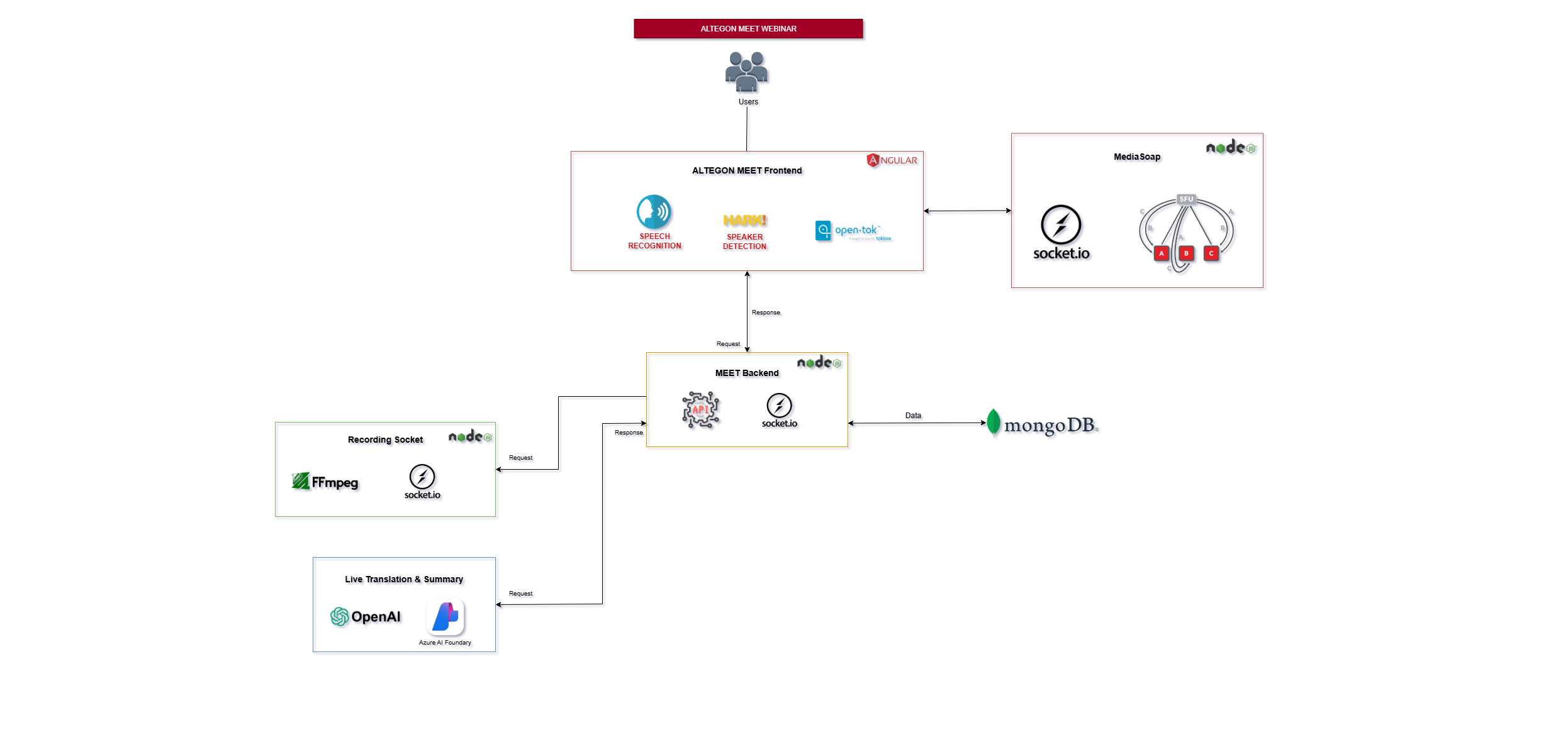
Architecture Overview
The Webinar Platform is a sophisticated solution designed for structured, presentation-focused events that combines high-quality real-time communication with scalable streaming capabilities. Built on the powerful Mediasoup library, it supports interactive webinars ranging from intimate 10-person sessions to large-scale events with 10,000+ attendees. The architecture provides role-based interfaces, real-time engagement tools, AI-powered transcription, and comprehensive analytics.
System Components
Frontend Layer
The frontend provides distinct interfaces optimized for different participant roles:
1 Host & Co-Host Interface
- Purpose: Full-featured control panel for webinar presenters and moderators
- Built With: Angular framework with specialized webinar components
- Key Features:
- Presentation Controls:
- Start/stop webinar sessions
- Screen sharing with application/window selection
- Camera and microphone management
- Recording start/stop controls
- Participant Management:
- Attendee list with real-time status
- Spotlight specific speakers
- Promote attendees to co-host
- OpenTok Layout Library:
- Dynamic video layout management
- Automatic layout switching based on content
- Hark Integration: Active speaker detection
- Speech Recognition:
- Real-time transcription of host/co-host speech
- Live caption generation for accessibility
- Analytics Dashboard: Real-time attendee metrics and engagement stats
2 Viewer Interface
- Purpose: Streamlined viewing experience for webinar attendees
- Technology: Lightweight Angular interface optimized for performance
- Key Features:
- Viewing Experience:
- High-quality video playback via Mediasoup
- Adaptive quality based on network conditions
- Layout optimized for presentations
- Live Captions: Real-time transcription display
Backend Services
The backend orchestrates all webinar logic, user management, and real-time coordination:
1 REST API Endpoints
- Key Endpoints:
- Webinar Management:
- Create webinars
- Update webinar settings and configurations
- Participant Management:
- Host/co-host authentication
- Attendee registration and approval
- Role assignments and privileges
- Attendee list retrieval
- Content Management:
- Recording access and download
- Transcript and summary retrieval
- Analytics & Reporting:
- Attendee statistics
- Engagement metrics
- Post-webinar reports
- Export functionality
2 Socket.IO Events (Real-time Communication)
- Webinar Room Management:
- Create webinar rooms with capacity limits
- Manage host, co-host, and attendee connections
- Handle room lifecycle (setup, live, ended)
- Enforce role-based access control
- Real-time Statistics Collection:
- Attendee Tracking:
- Live participant count
- Connection quality metrics
- Geographic Analytics:
- Participant's location (city and country)
- Regional distribution mapping
Database Layer
MongoDB
- Purpose: Centralized storage for all webinar data
- Stored Data:
- Webinar Sessions: Webinar metadatas
- Analytics & Statistics:
- Total attendee count
- Geographic distribution
- Recordings & Transcripts:
- Recording file paths and metadata
- Complete transcriptions with timestamps
- AI-generated summaries
Recording Server
A dedicated microservice responsible for video recording and processing:
Key Features:
- FFmpeg Integration:
- Processes incoming video blobs in real-time
- Creates video segments for efficient streaming
- Encodes final output to MP4 format
- Storage Management: Saves processed recordings to designated file paths
- Socket Communication: Send and Receives video blob data via Socket.IO events
- Processing Pipeline:
- Receives raw video blob from active meeting
- Processes and segments video using FFmpeg
- Creates optimized MP4 file
- Stores recording at configured storage location
Transcription & Summary Generation Component
An AI-powered service for generating meeting transcripts and summaries:
Transcription Service
- Technology: Azure AI Foundry Model
- Function: Converts spoken audio to accurate text transcription
- Features: Real-time transcription during meetings
Summary Generation
- Technology: OpenAI Model (GPT-based)
- Function: Analyzes complete transcription to generate concise meeting summaries
- Output: Meeting overview for quick review
Mediasoup Server (Webinar Video Engine)
The Mediasoup Server is the core real-time communication engine that powers the webinar's audio/video functionality:
What is Mediasoup?
Mediasoup is a cutting-edge WebRTC Selective Forwarding Unit (SFU) that enables efficient, scalable real-time media communication. Unlike traditional peer-to-peer WebRTC or MCU (Multipoint Control Unit) architectures, Mediasoup uses a more efficient approach ideal for webinars.
Mediasoup Architecture in Our Platform:
Core Mediasoup Concepts:
- Producers
- Definition: A producer represents an outgoing media stream (audio or video) from a participant
- In Webinar Context:
- Host Producers:
- Camera video producer (host's webcam)
- Screen sharing producer (presentation/demo)
- Microphone audio producer (host's voice)
- Co-Host Producers:
- Camera and audio producers when speaking
- Additional screen sharing if needed
Producer Properties:
- ID: Unique identifier for the producer
- Kind: "audio" or "video"
- RTP Parameters: Codec, bitrate, resolution settings
-
Paused State: Can be paused/resumed without destroying
-
Consumers
Definition A consumer represents an incoming media stream that a participant receives In Webinar Context
Each attendee has consumers for:
- Host's camera video
- Host's screen share
- Host's audio
- Co-host's media (if present)
Consumer Properties
- ID: Unique identifier
- Producer ID: Which producer it's consuming from
- Kind: "audio" or "video"
- Layers: For simulcast (multiple quality levels)
-
Priority: For bandwidth management
-
Routers
Purpose Mediasoup Router manages all producers and consumers for a webinar session
Functions
- Creates and manages producers/consumers
- Routes media between participants
- Handles codec negotiation
- Manages bandwidth allocation
Data Flow Architecture
Complete Webinar Workflow:
Phase 1: Webinar Setup & Registration
- Webinar Creation: Host creates webinar via REST API
- Database Entry: MongoDB stores webinar metadata
- Attendee Registration:
- Users register with required information
- Approval workflow (if required)
Phase 2: Webinar Start (Host Preparation)
- Host Login: Authentication via REST API
- Room Creation: Backend creates Mediasoup router via Socket.IO
-
Producer Setup:
- Host connects to Mediasoup server
- Creates camera video producer
- Creates microphone audio producer
-
Transcription Activation: Azure AI Foundry starts listening
- Recording Initialization: Recording server prepares for capture
Phase 3: Attendees Join
Access Control: Token validation for registered attendees Socket Connection: Attendees connect via WebSocket Room Join: Backend adds attendee to webinar room Consumer Creation: - Request available producers (host's camera, audio, screen) - Create consumers for each producer - Mediasoup routes media streams
Phase 4: Live Webinar (Active Session)
-
Real-time Transcription (if enabled): Transcription generated and boadcast to all attendees via WebSocket
-
Chat: Messages sent via WebSocket and broadcast to participants
Phase 5: Webinar End
- Host Ends Session: Closes all producers
- Attendee Disconnection: All consumers gracefully closed
-
Recording Finalization:
- Recording Server processes final segments
- FFmpeg creates final MP4 file
- File uploaded to storage
-
Final Statistics: Complete session data saved to MongoDB
Phase 6: Post-Webinar Processing
- Summary Generation: OpenAI GPT receives complete transcript and analyzes content structure and themes
- Analytics Report:
- Attendance statistics compiled
- Geographic distribution mapped
Mediasoup Details
Core Components:
1. Workers
- Node.js child processes that handle media routing
- Each worker runs independently on a CPU core
- Load balancing across workers for scalability
2. Routers
- Created within workers
- Each webinar session gets its own router
- Handles all producers and consumers for that session
- Manages RTP (Real-time Transport Protocol) streams
3. Transports
WebRTC transport connections between clients and server - Two types: - Plain Transport: For server-to-server communication - WebRTC Transport: For client-to-server communication
Each client typically has: - One send transport (for producers) - One receive transport (for consumers)
4. RTP Parameters
-
Defines media stream characteristics:
- Codec: VP8, VP9, H.264 for video; Opus for audio
- Bitrate: Maximum and target bitrates
- Resolution: Video dimensions
- Frame rate: For video streams
API Documentation
For detailed REST API endpoints, authentication methods, and integration guides, please refer to the Conference API Documentation page.
Support & Contact
For technical implementation assistance, troubleshooting, or additional architecture details, please contact our support team.